Skip to content

Team Health Secret

  • Affiliate dept
  • CS team
  • Content team
  • Video team
  • Tech team
  • Home
  • Affiliate dept
  • How to change an affiliate’s password

How to change an affiliate’s password

January 12, 2024January 12, 2024 Tech

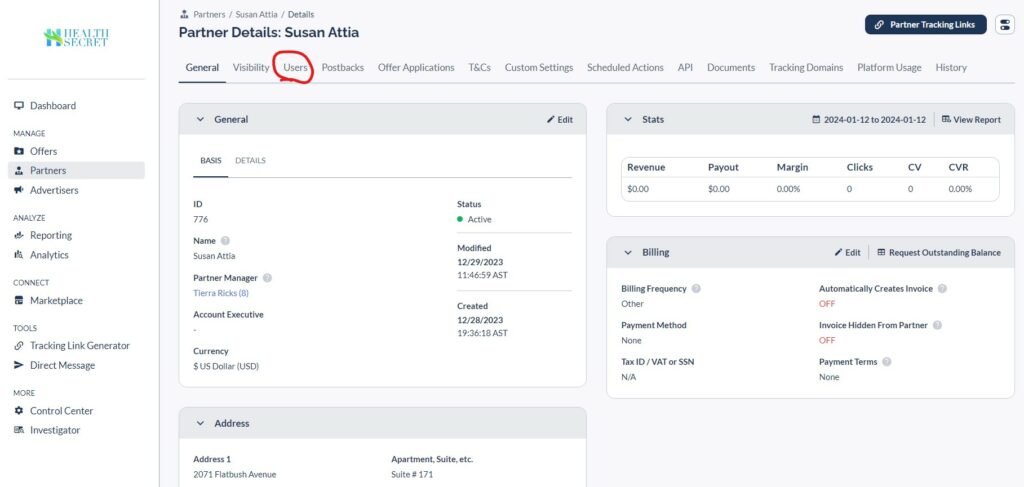
Go to Partners->Users
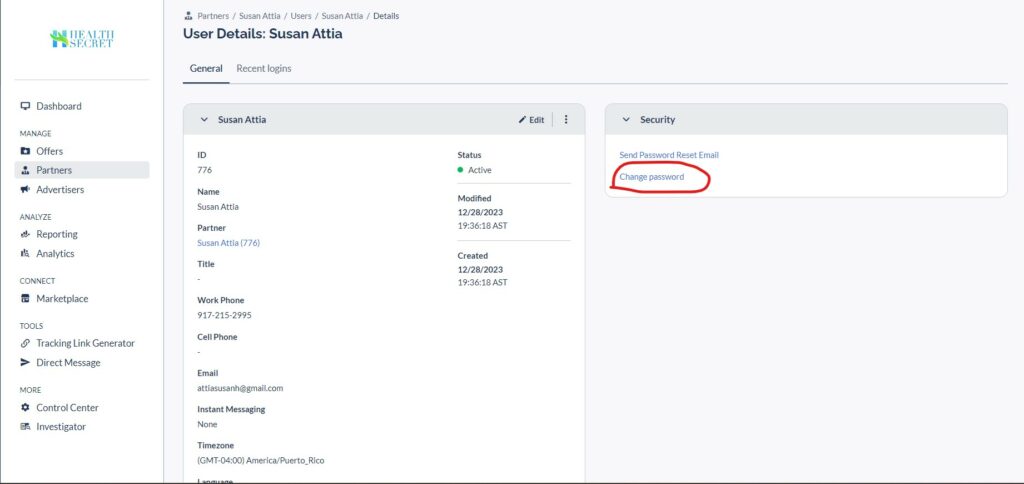
If the Affiliate has more than one user, select for whom you want to change the password. Next, go to the Change Password link
Affiliate dept Everflow Tech team

Post navigation

How to populate affiliate links for a launch
How to Add Two-Factor Authentication in WordPress

Related Posts

How to create an invoice

Login to your Everflow account. Go to Partners->Invoices https://health-secret.everflowclient.io/affiliates/invoices Create a new invoice Select the Affiliate for which you want to create an Invoice. Select Time period. Check the box if you want the invoice to be hidden from the affiliate Don’t forget to mark the info as paid after payment

How to reject refunded orders in Everflow

NOTE: The order may not be available in EverflowGot to the Everflow -> Reporting -> Convertion Select the Date Range and click Run Report In the search bar, select the Order ID search to find the order you are looking for Check the box. Actions->Reject

How to populate affiliate links for a launch

Copyright © 2026 Team Health Secret | Marvel Blog by Ascendoor | Powered by WordPress.