Skip to content

Team Health Secret

  • Affiliate dept
  • CS team
  • Content team
  • Video team
  • Tech team
  • Home
  • CS team
  • Live Agent – How to check missed calls

Live Agent – How to check missed calls

November 6, 2024 Tech

https://support.healthsecret.com/agent/index.php#login

  1. Login to your Live Agent Account
  2. Click the Call History button

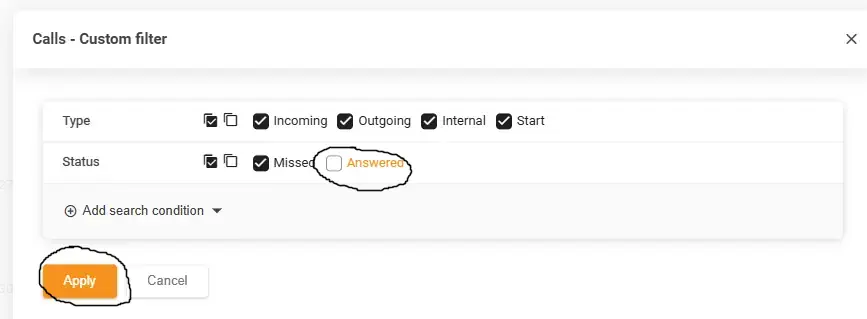
3 Click the customized filter, uncheck the answer and press apply.

CS team Tech team

Post navigation

Grant access to the offer – Kajabi
How to add an Article to the Knowledgebase in Live Agent

Related Posts

Grant access to the offer – Kajabi

Kajabi – /admin/sites/2147531127/contacts 1 Go to the Kajabi->Contacts->All Contacts 2 Paste the customer’s email address on the Search Contact bar 3 Click View 4 Under More Actions, click Grant Offers. 5 On the Search Bar, type in the product that you want to give access to, select the product then click Save.

Retention

This article explains the algorithm for retaining users who have requested a refund. If a CS agent receives a refund request from a customer, they must find out the order number. Next, you need to add ONLY the order number to the “Refund” channel in Slack. In response, you will receive a link to the […]

How to unsubscribe a user

Go to the Unsubscribe channel in Slack Write the email address of the user you want to unsubscribe. Just an email address and nothing else. You will receive a response whether your user has been successfully unsubscribed. If a user is not found, they may not be in our lists or have been unsubscribed before. […]

Copyright © 2026 Team Health Secret | Marvel Blog by Ascendoor | Powered by WordPress.
